Strata by TideReach Ltd Download
File-estate analytics for SMB and NFS

Know what is on your file servers, and who can reach it.

Strata scans your Windows, NAS and Linux file shares and shows how much is there, how old it is, what kind it is, who owns it, how fast it is growing, and who can really open each folder once nested groups are counted. The answers to "why is the F: drive full?" and "who can see Payroll?" in seconds, from one self-hosted console.

Download the free edition See pricing Free up to 2 TB. No agents on file servers, nothing leaves your network.
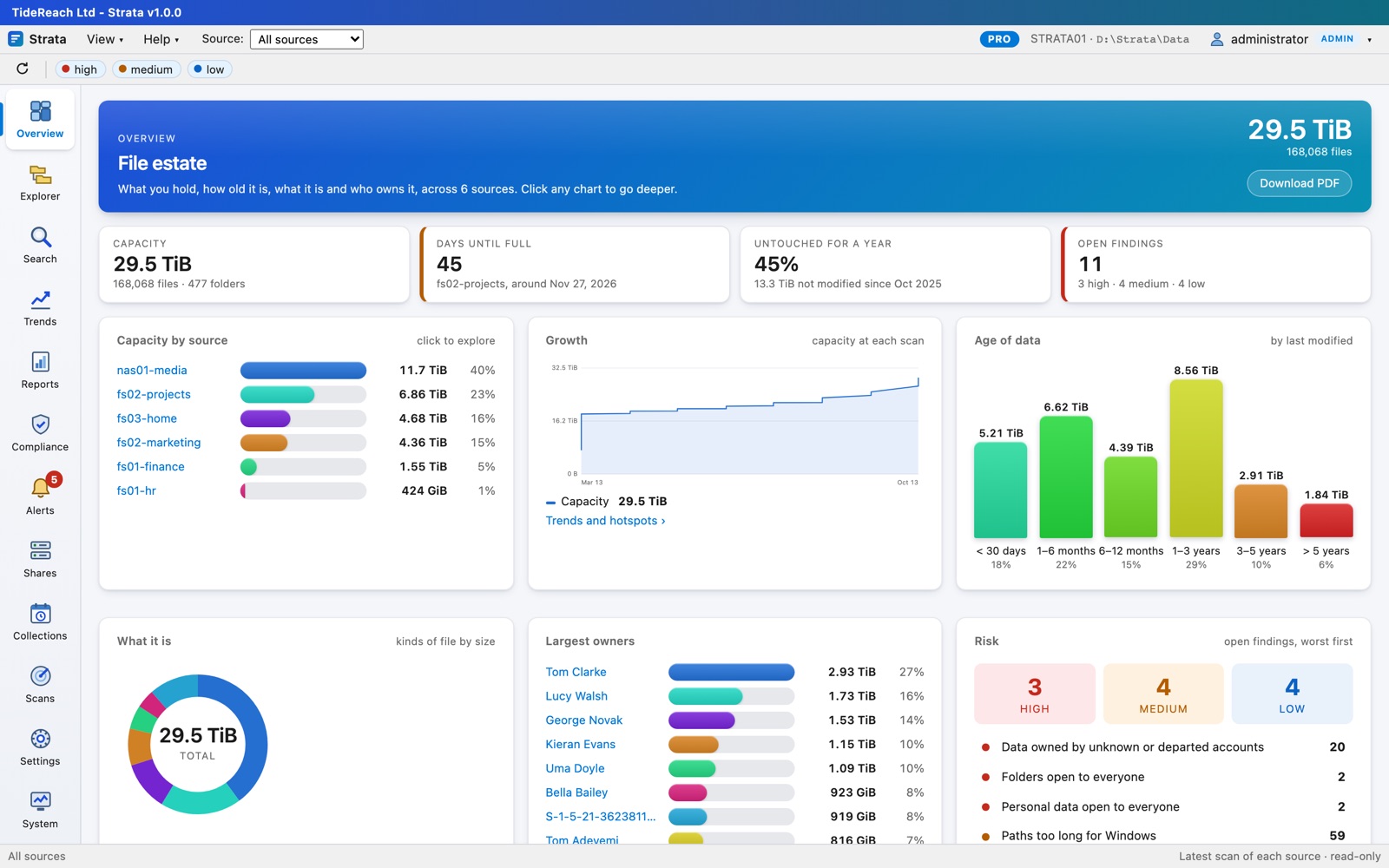
The Strata Overview for Contoso Ltd: 29.5 TiB in six sources, the Projects volume due to fill in 44 days, capacity by source, growth across scans, age of data, kinds of file, largest owners and open findings
SMB and NFSWindows file servers, NAS appliances and Linux exports, read over the network
32 reportscapacity, age, structure, changes, security and people, as PDF or CSV, emailed on a schedule
Effective accessevery group expanded to the people inside it, disabled and deleted accounts flagged
Windows or LinuxMSI, .deb, .rpm; one service, a browser console, your own HTTPS certificate
What you see

The whole estate on one page, and every folder one click away.

Strata keeps every scan it takes, so each view is both the state of things now and how it got there. Reports are read from compact files on the Strata server, so they appear at once even for tens of millions of files, and nothing touches the file servers until the next scan.

EXExplorer

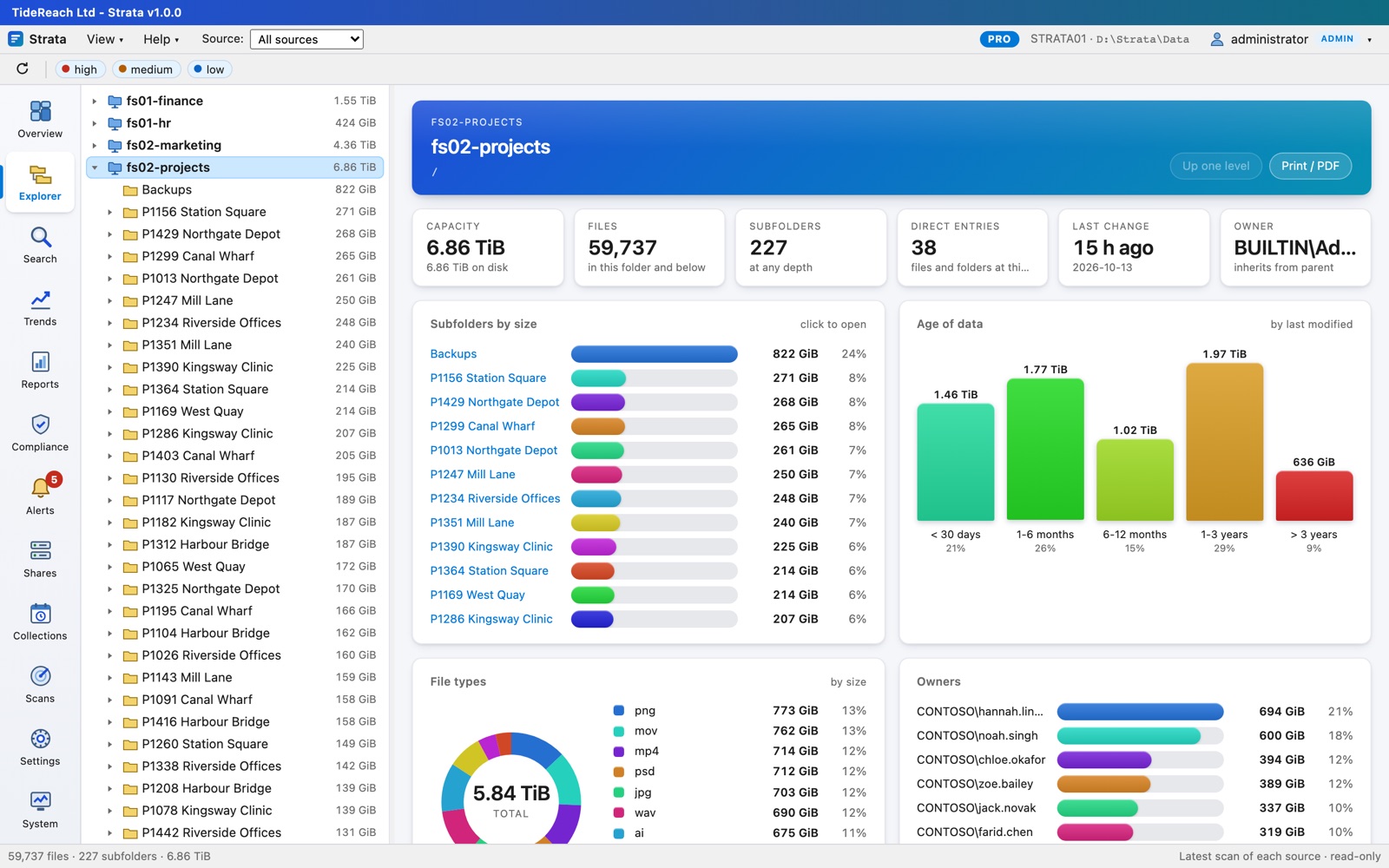
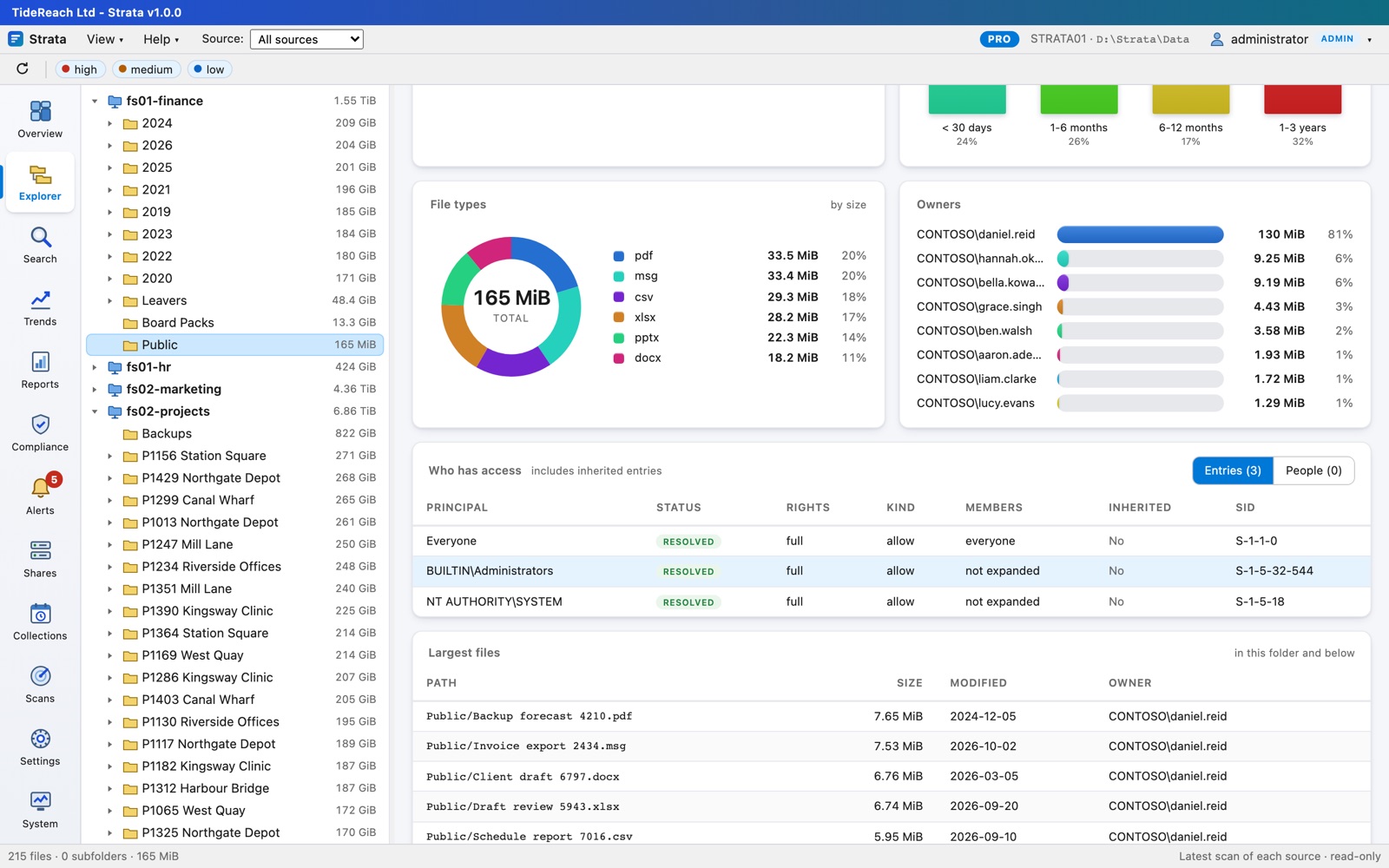
Every share as a folder tree with sizes, owners and history.

  • Capacity, files, subfolders, last change, owner and their manager for any folder.
  • Subfolders by size, age of the data, file types, owners and the largest files, all drawn.
  • Hints for flat folders with tens of thousands of entries, deep nesting and paths too long for Windows.
Explorer showing the Projects share with subfolders by size, age and file types
QSearch

Find anything across every scan, by what it is rather than where it is.

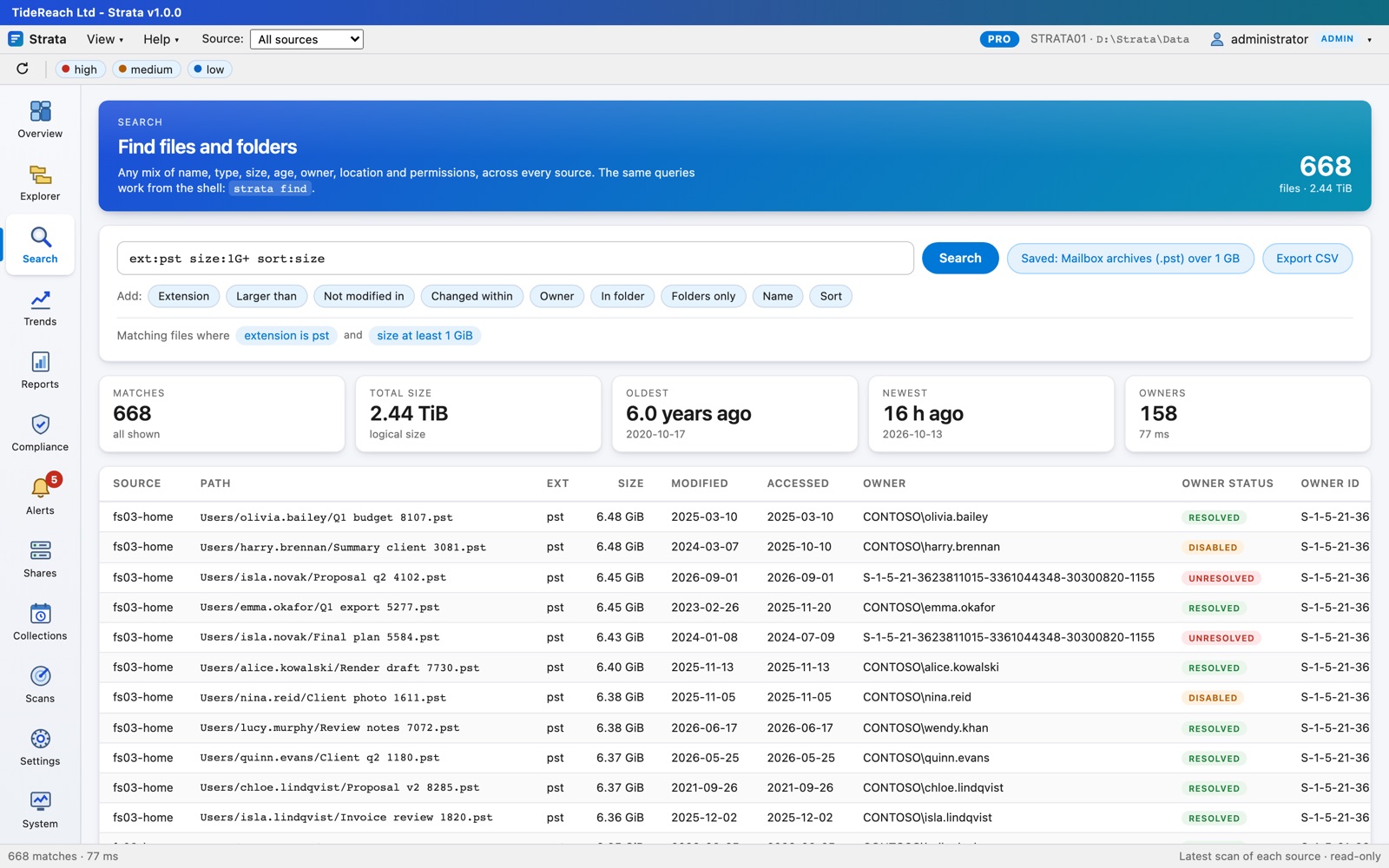
  • Mix name, extension, size, age, owner, location and permissions: ext:pst size:1G+ sort:size.
  • Save searches, share them, and watch one to be alerted when a scan brings new matches.
  • Export any result as CSV.
Search results for mailbox archives over 1 GB, biggest first
RReports

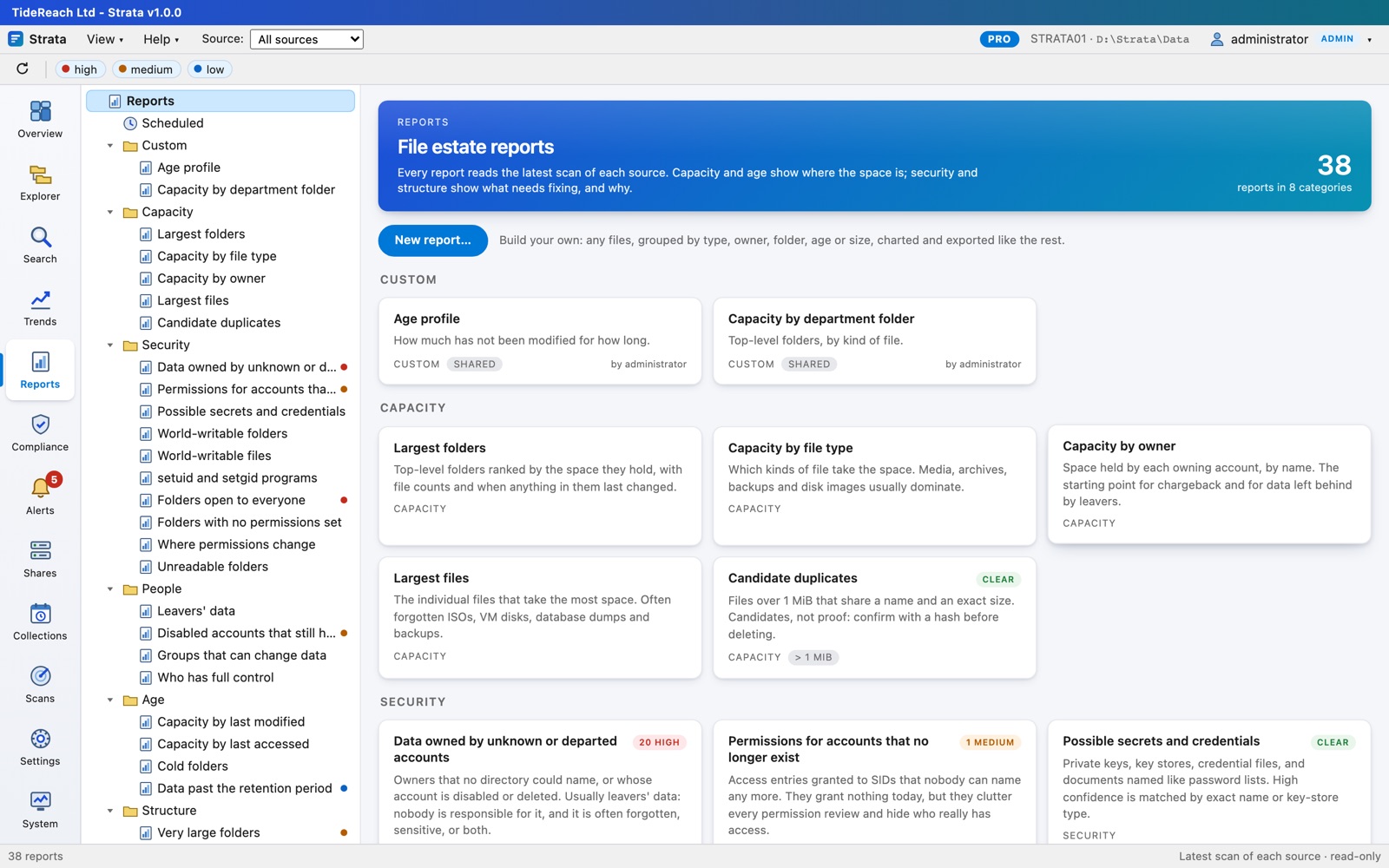
Thirty-two reports, charts already drawn.

  • Largest folders and files, capacity by type and owner, candidate duplicates.
  • Age by last change and last access, and cold folders that can move to cheaper storage in one go.
  • Flat folders, deep nesting, long paths, bad names, case collisions, mass renames and growth.
  • Build your own without SQL: any search, grouped and charted, with a live preview.
The Reports catalogue grouped into Capacity, Age, Structure, Changes, Security and People
TTrends

Where the space went, and when.

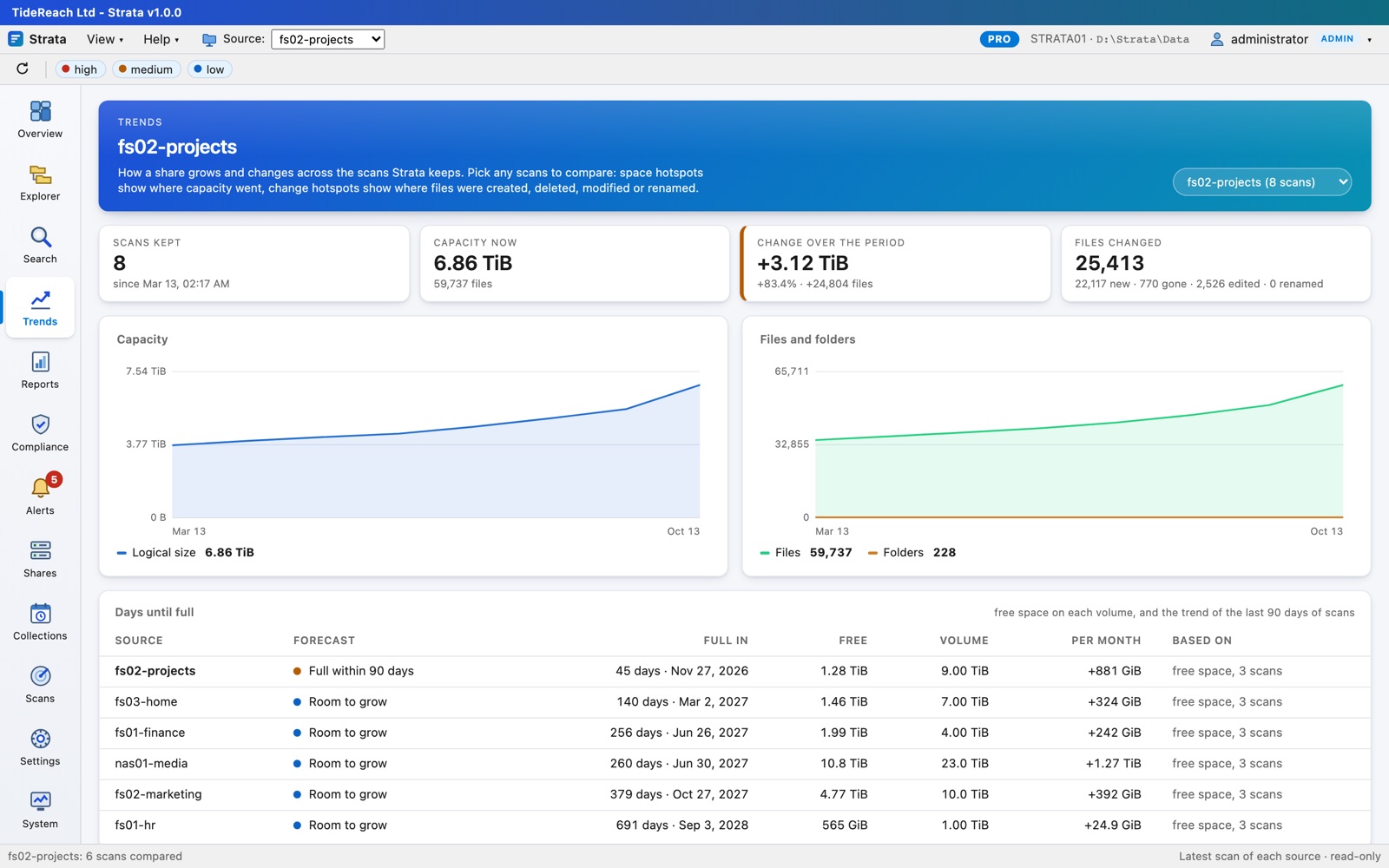
  • Growth of each source across the scans kept, month by month.
  • Compare any two scans: space hotspots show which folders grew, change hotspots where files were created, deleted, modified or renamed.
  • Days until full for every volume, from its free space and the trend of recent scans, with an alert when one is due to fill within 90 days.
  • Have the conversation with finance before the volume fills, not after.
Trends for the Projects share: growth over eight months, and days until full for every volume, the Projects volume due in 44 days
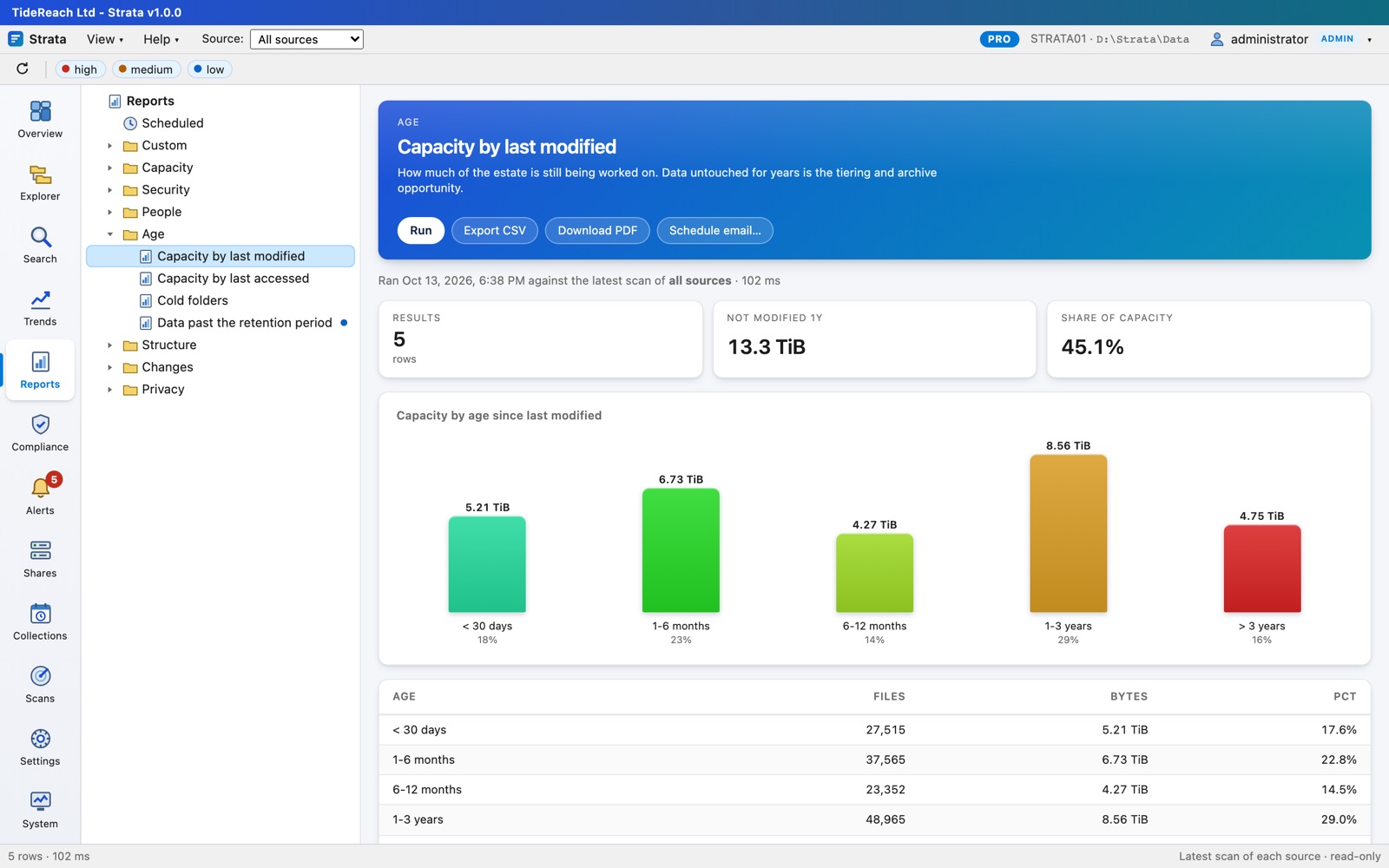
Age of data report
Age of data. How much has not been touched in one, three or seven years: the case for archiving, in a chart.
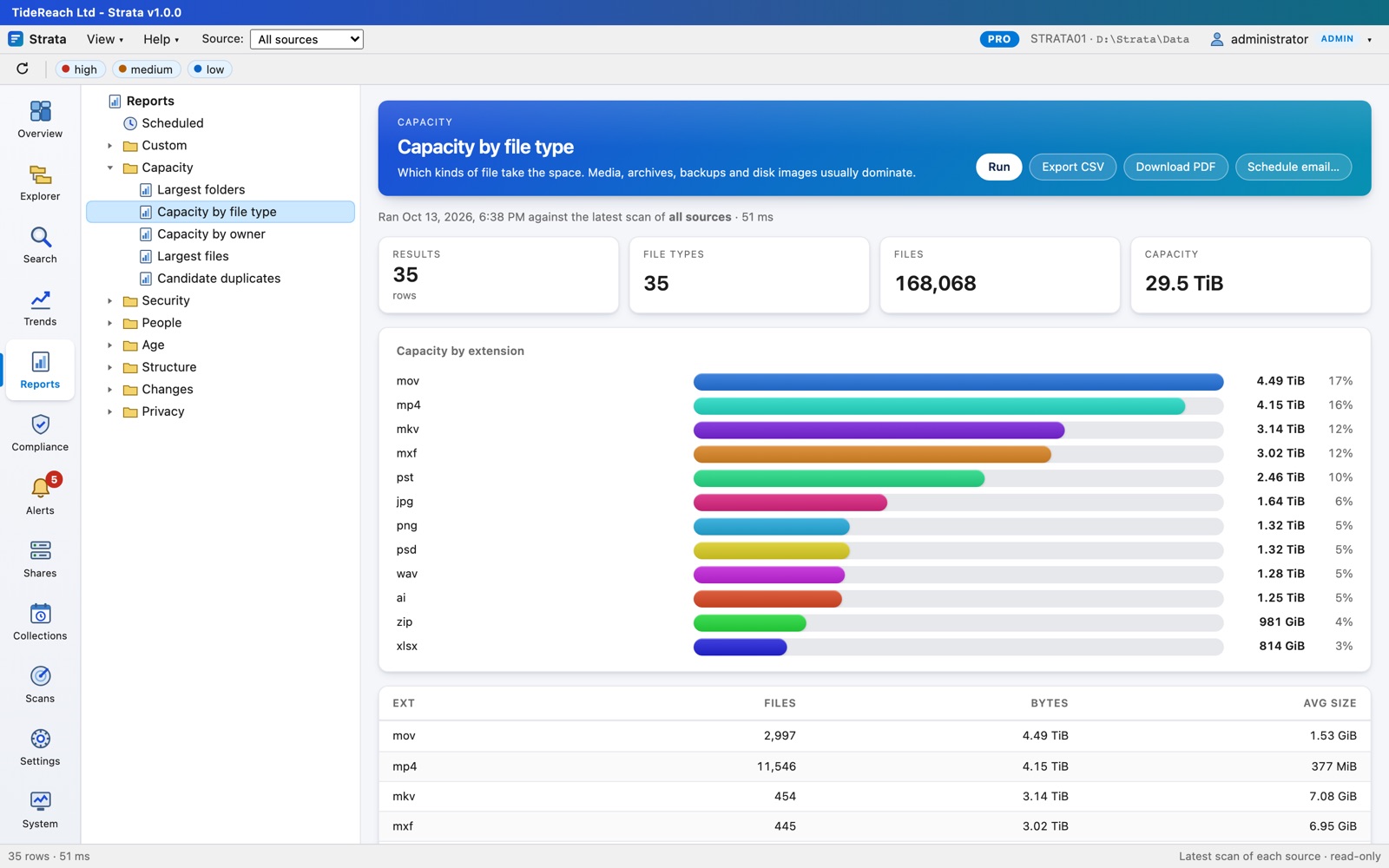
Capacity by file type report
File types. Video, backups, disk images and mailbox archives on shares that were meant for documents.
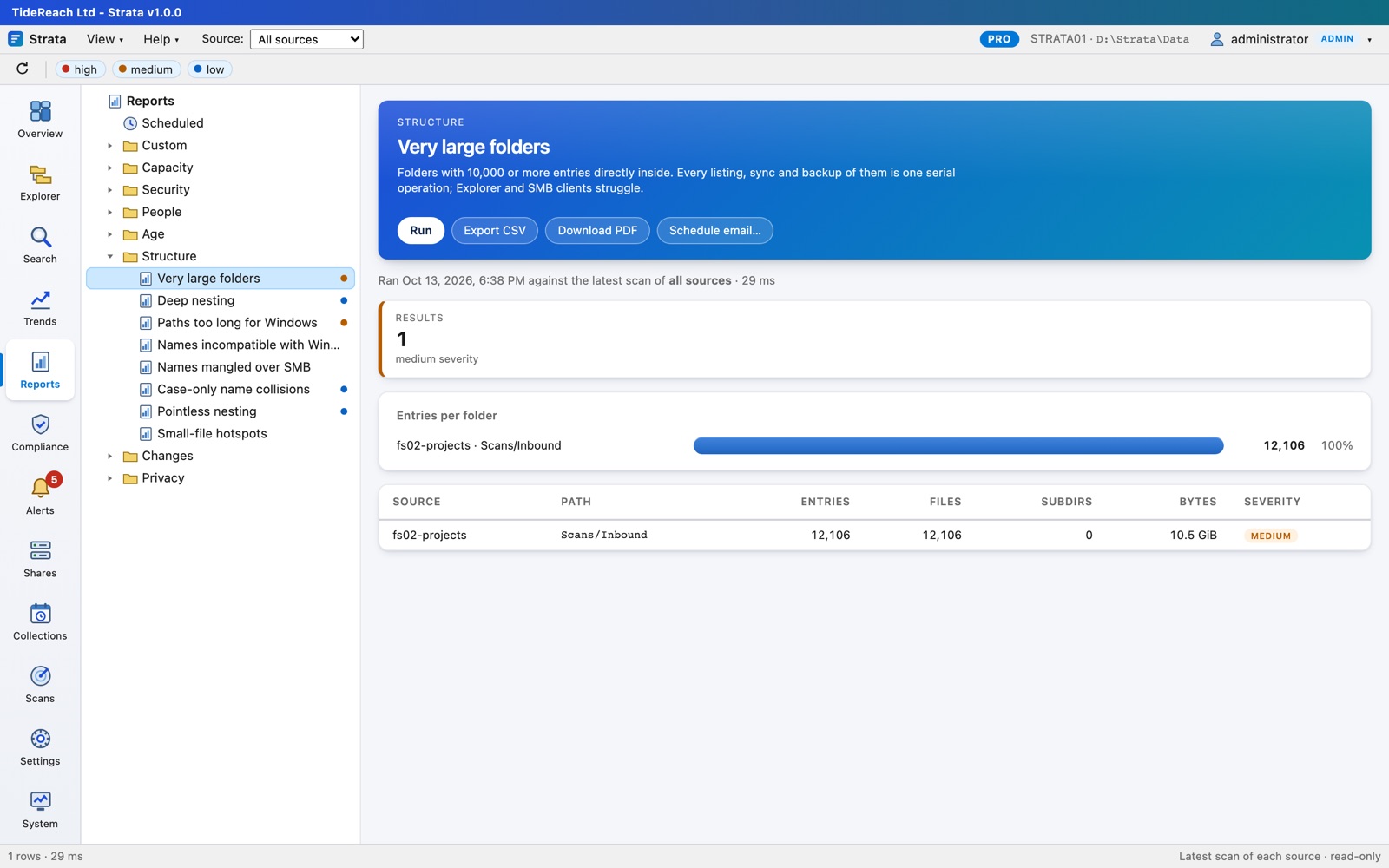
Flat folders report
Flat folders. The scanner inbox with 12,400 files that makes every Explorer window on the share hang.
Access and people PRO

Not just which groups are on a folder: which people are in them.

A folder's permissions name groups, and groups contain groups. Strata reads Active Directory, expands every group to the people inside it however deeply nested, and tells you who can read and who can change each folder, which of them have left, and whose data is still sitting on the shares after they went.

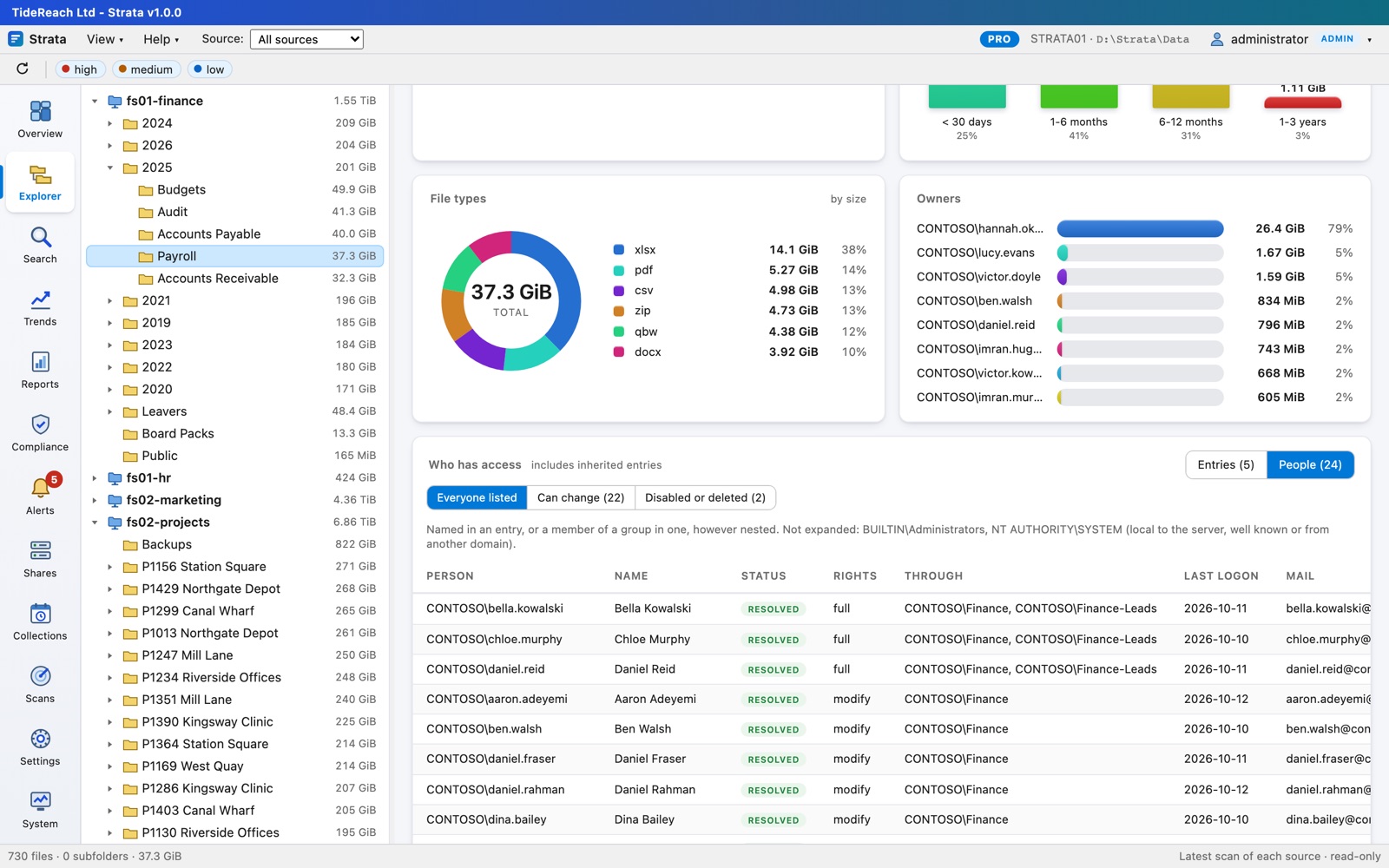
ACWho has access

The folder's permissions, and how many people each entry really means.

  • Every permission entry with its rights, inheritance, and the real size of each group.
  • People turns them into the named people behind them, with their strongest right and the groups that grant it.
  • Filter to those who can change data, or to disabled and deleted accounts.
People with access to the Payroll folder, through nested groups
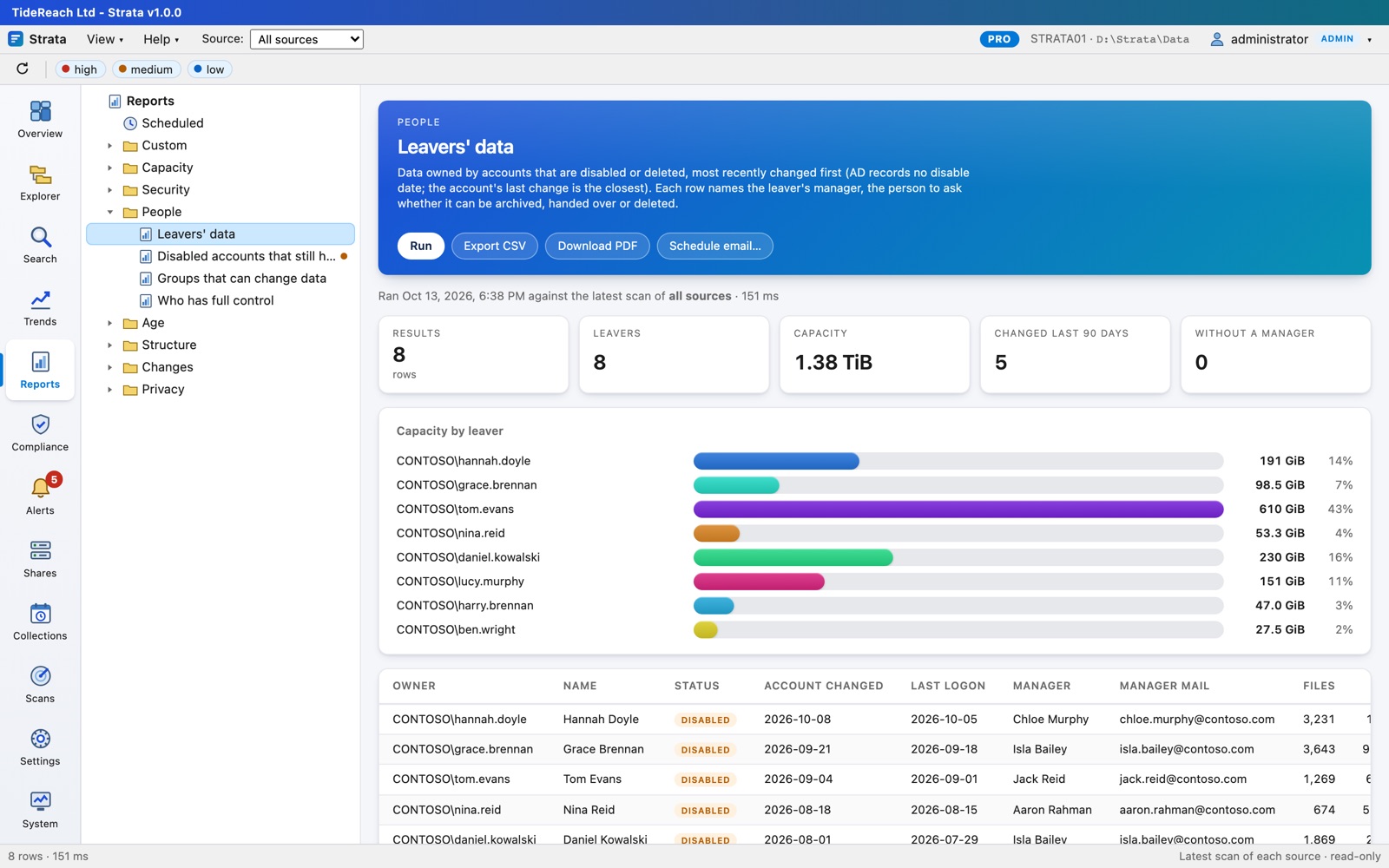
LLeavers' data

What people left behind, and who to ask about it.

  • Files owned by disabled or deleted accounts, most recently changed first.
  • Each leaver's manager from AD: the person who can say archive, hand over or delete.
  • Owners that no longer resolve at all, and permissions that name deleted accounts.
Leavers' data report with each leaver's manager
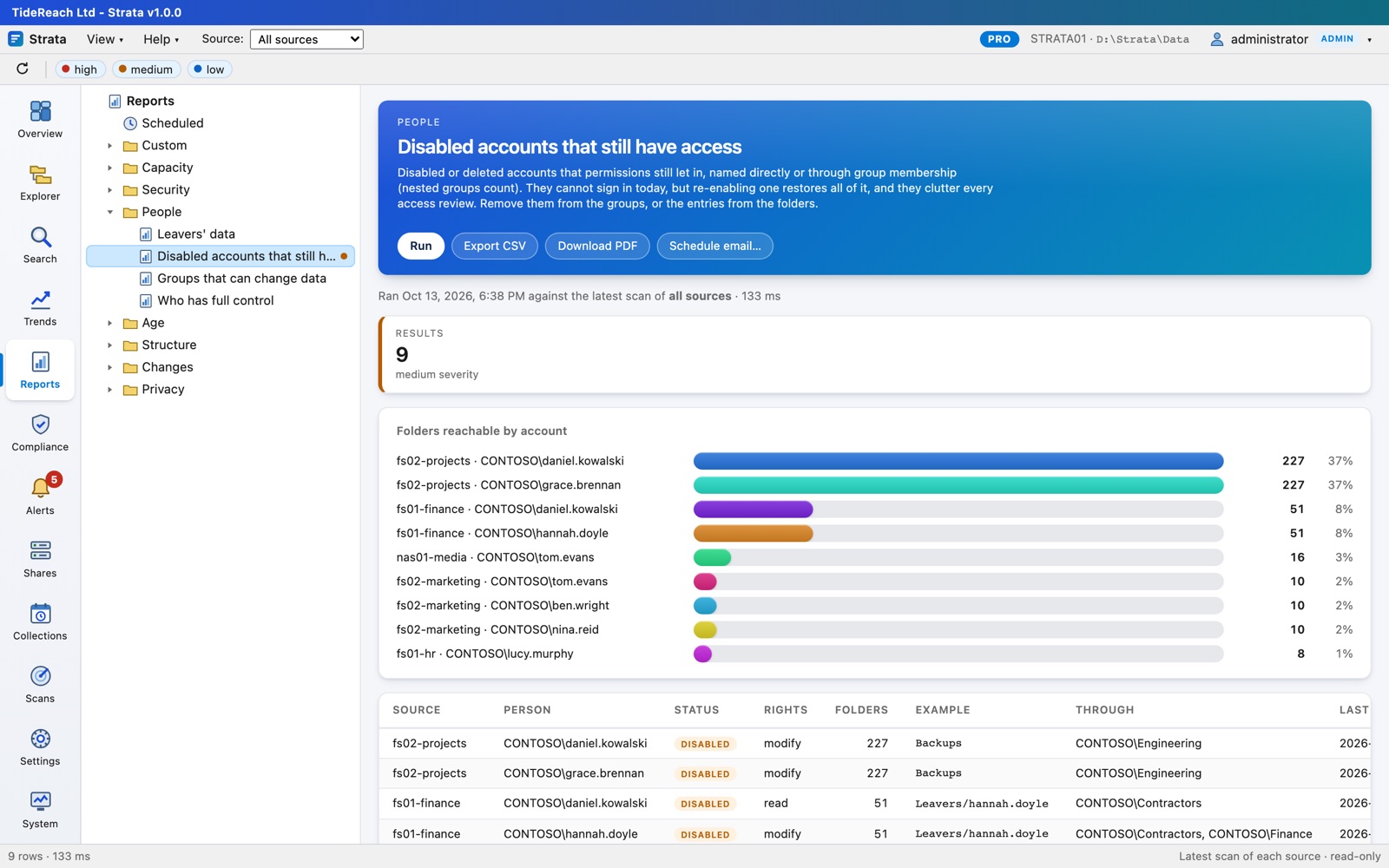
Disabled accounts that still have access
Disabled accounts that still have access, through any group, however nested, and how many folders each can reach.
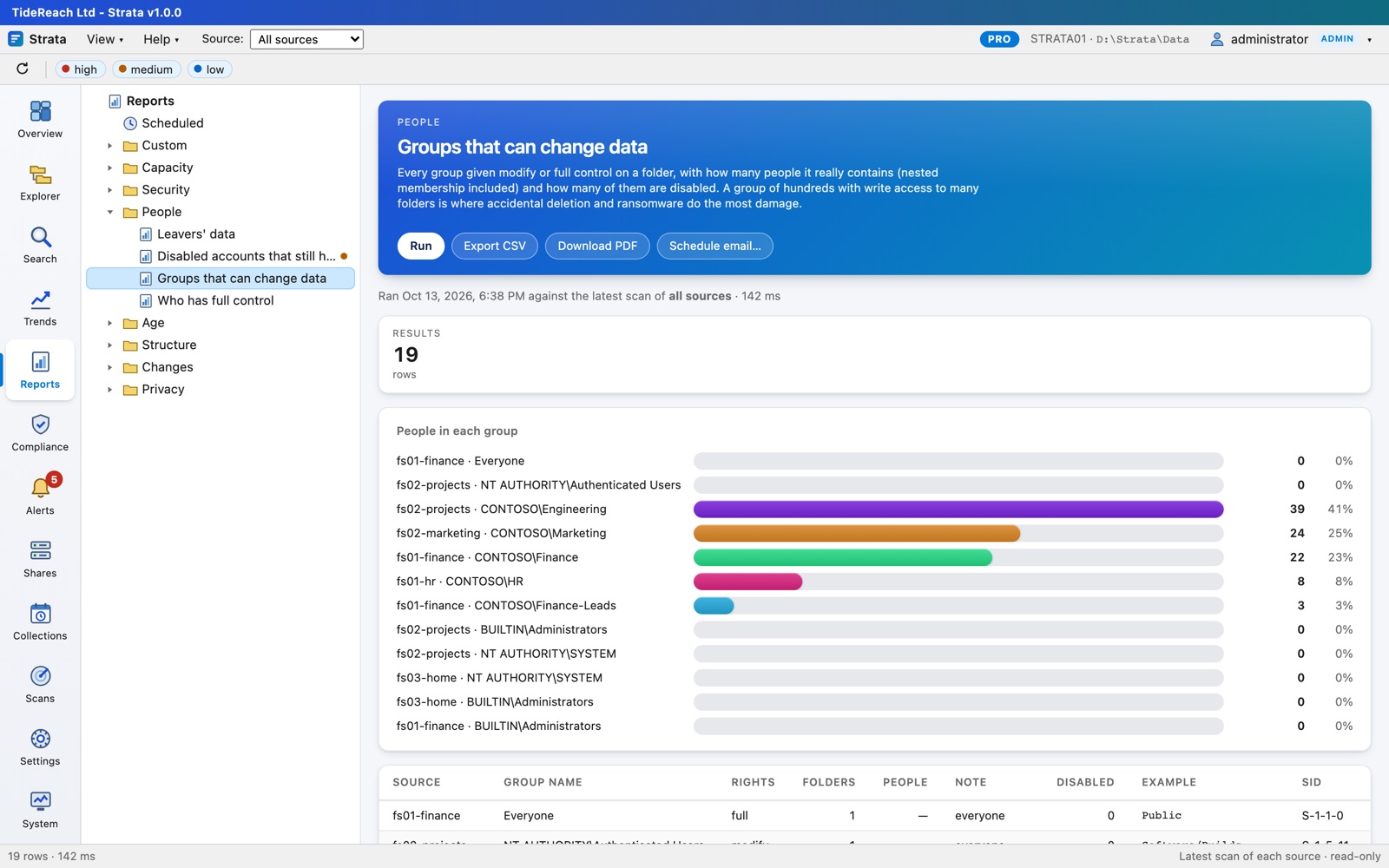
Groups that can change data
Groups that can change data: every group with modify or full control, how many people it holds, how many are disabled.
A folder where Everyone has full control
Open folders. Everyone or Authenticated Users with change rights, null DACLs, world-writable NFS paths and files that look like keys or password lists.
Compliance packs PRO

UK GDPR, Cyber Essentials and ISO 27001, measured from your shares.

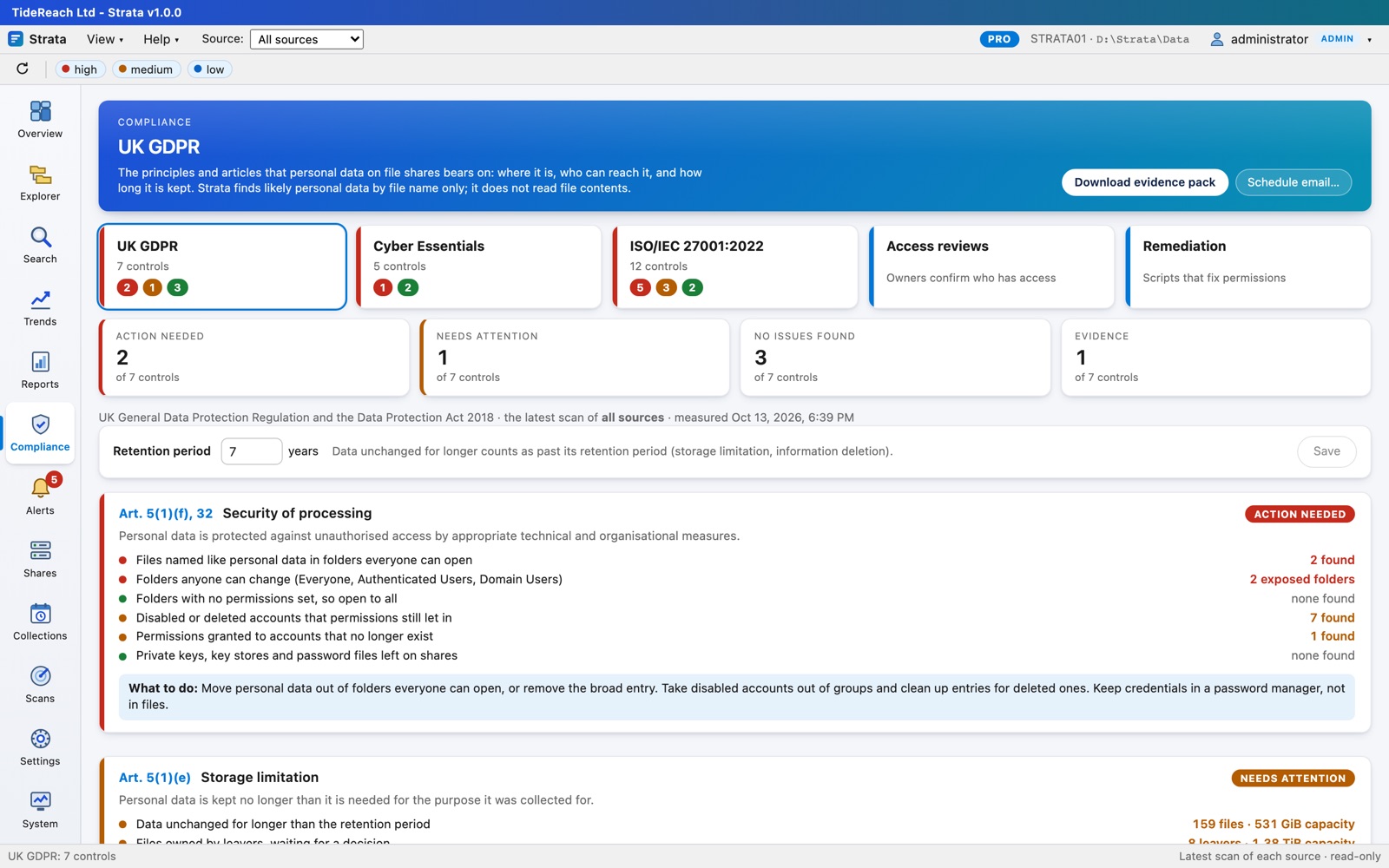
Every scan becomes evidence an auditor recognises. For each control: what it asks for, what Strata checked, what it found, and what to do. Controls a file-share tool cannot speak to are marked as outside it rather than quietly left out.

§Evidence packs

From "are we compliant?" to a PDF with the answer.

  • Security of processing, storage limitation, data minimisation and records of processing for UK GDPR.
  • User access control and secure configuration for Cyber Essentials.
  • Twelve Annex A controls for ISO/IEC 27001:2022, from inventory to data leakage.
  • Personal data found by file name (passports, payslips, P60s, contracts, medical records), and flagged where everyone can open it.
  • An evidence pack PDF on demand, or emailed to your DPO every month.
The UK GDPR compliance pack with each control's status
✓Access reviews

The people who own the data say who should reach it.

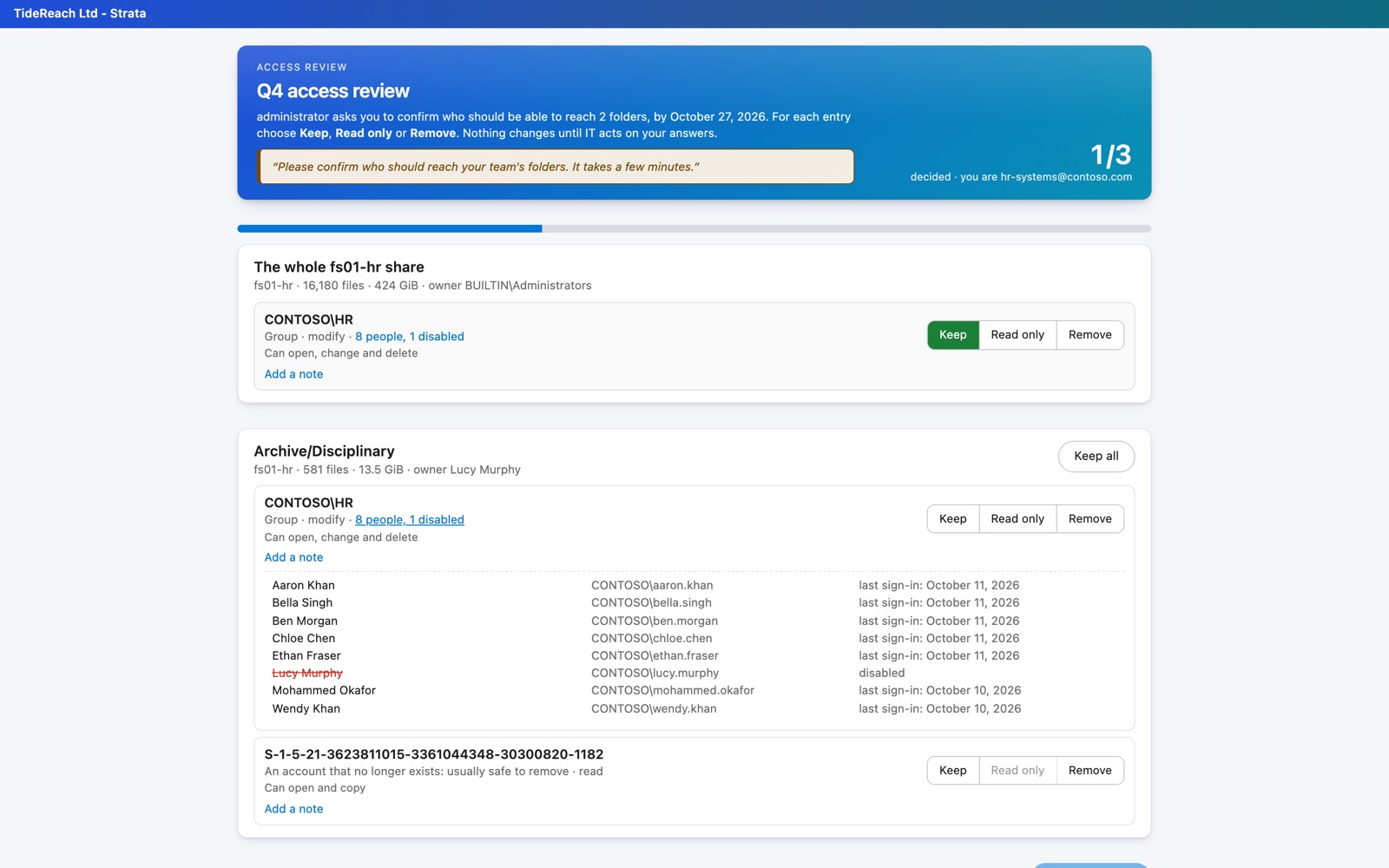
  • Every share root and every folder where access changes, sent to the right owner: no spreadsheets, no chasing.
  • Reviewers follow an emailed link, no account needed, and see the real people behind every group.
  • Keep, read only or remove for each entry, with notes, reminders and a full audit trail.
  • Decisions become a remediation plan: applied by Strata after a dry run and a second administrator's approval, or run as a PowerShell script. Every change is backed up, can be undone, and is confirmed by the next scan.
An owner reviewing who can reach their folders
The console

Built to be left running.

Alerts that mean something

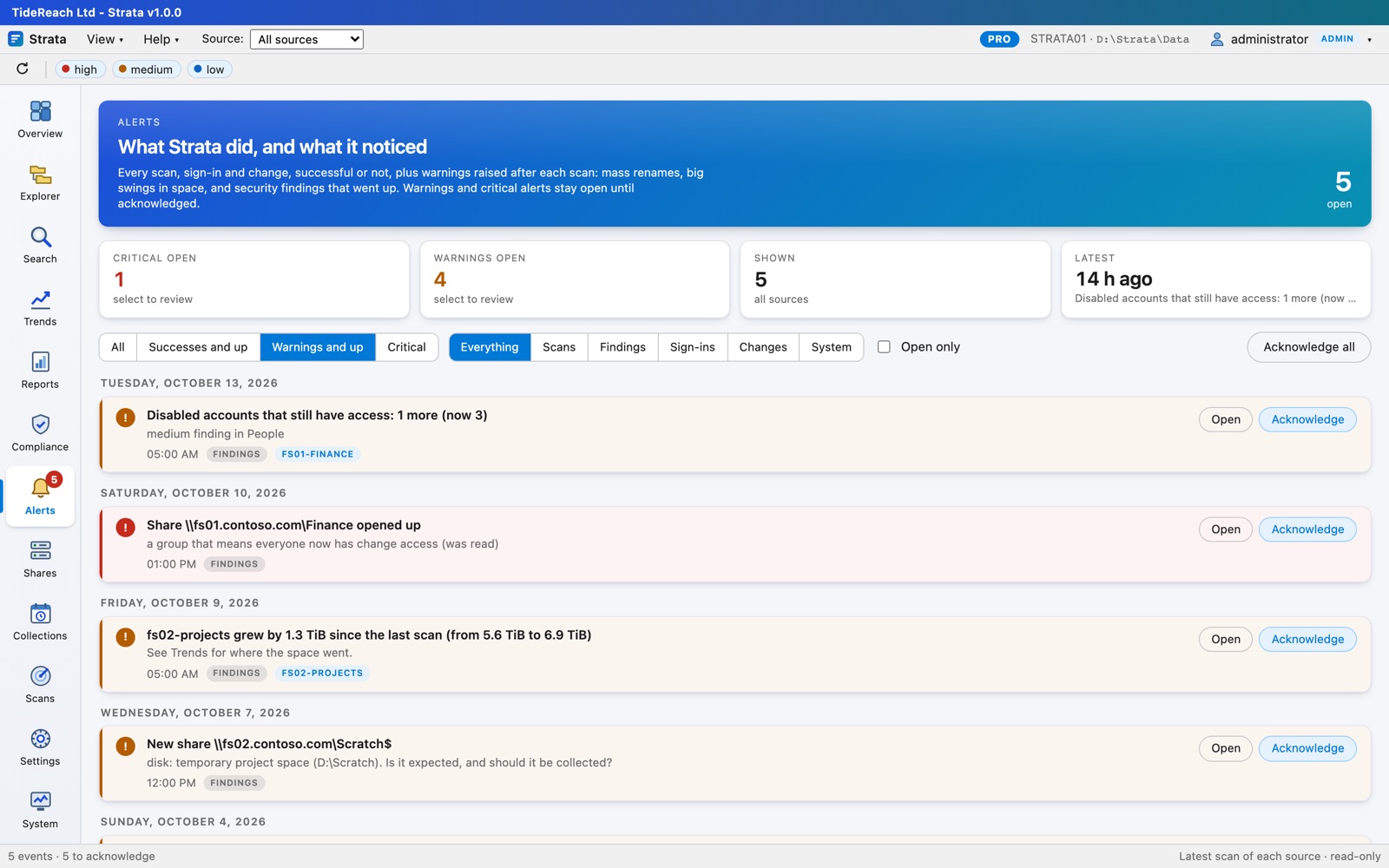
After each scan Strata looks for mass renames to one extension (the ransomware pattern), big swings in capacity, findings that went up, new shares and shares opened to everyone. Send them to Teams, Slack or any webhook.

Alerts page with open findings

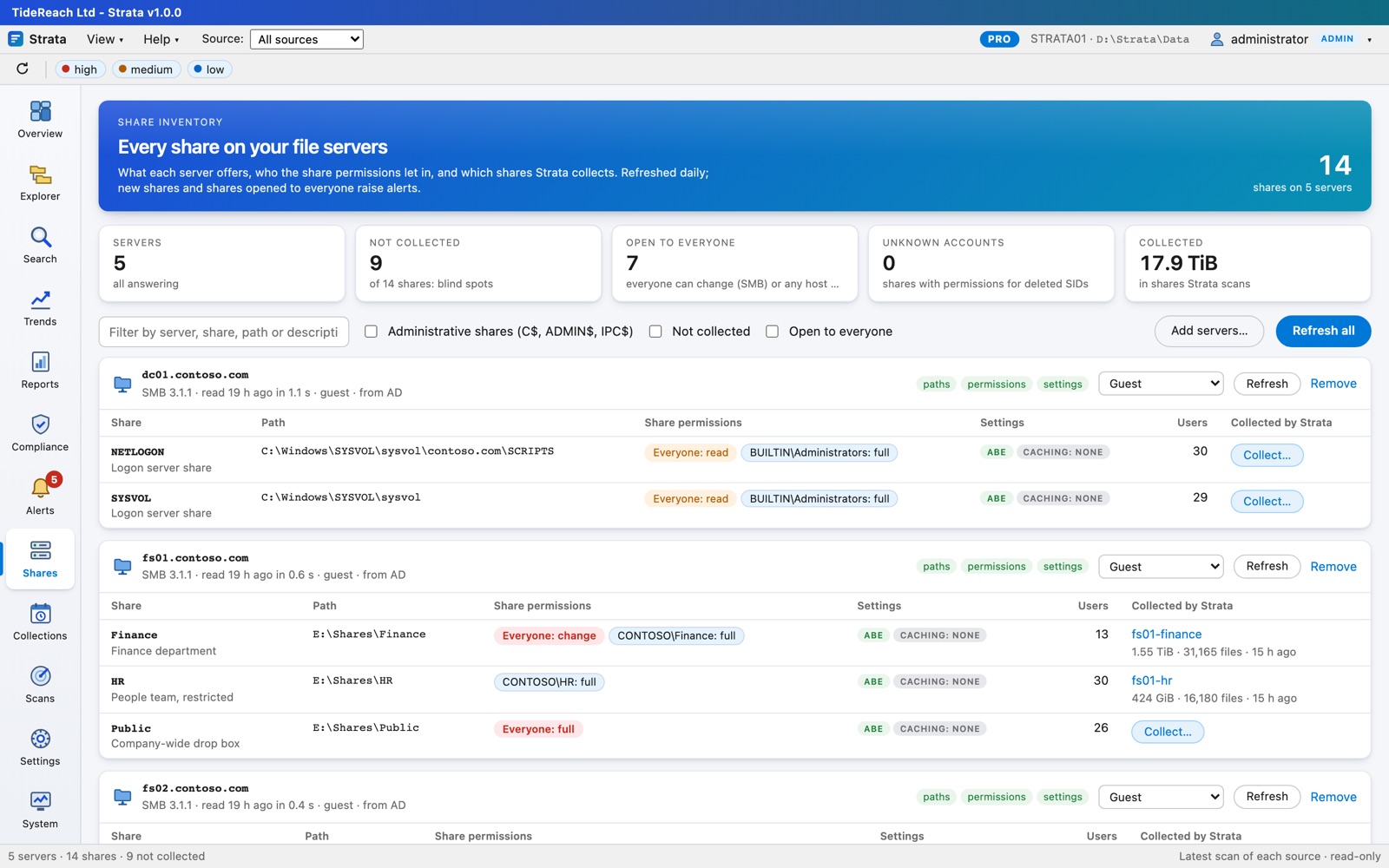
Every share, found for you

The share inventory lists every SMB share and NFS export on your servers, found by name or from Active Directory, with share permissions, encryption and which collection covers it. One click starts collecting the rest.

Share inventory

Schedules and retention

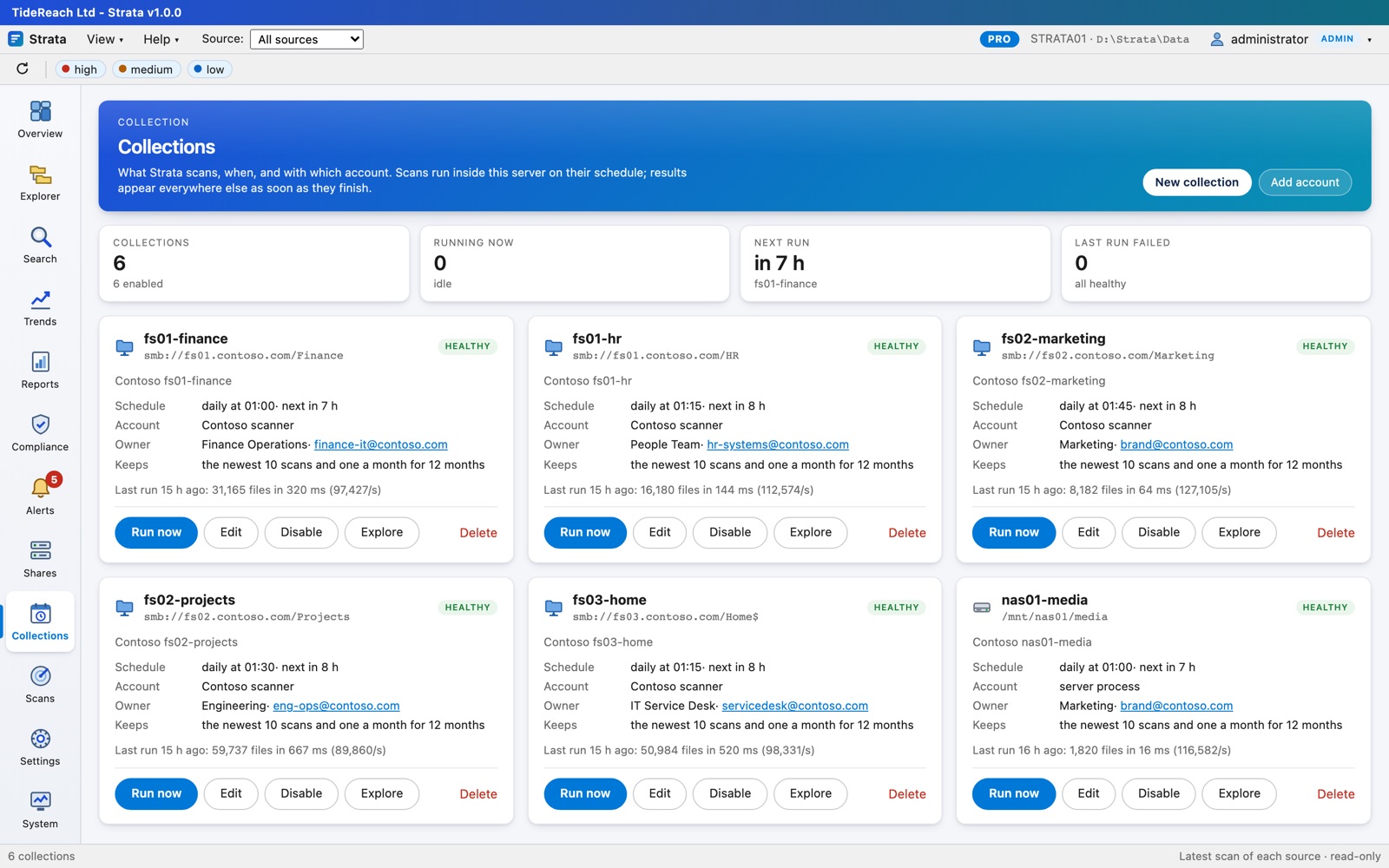
Scan each collection daily, weekly or monthly with its own read-only account. Keep the newest scans, every scan from recent days, and one a month for long-term trends; old scans are pruned for you.

Collections with schedules

Reports by email, as a PDF

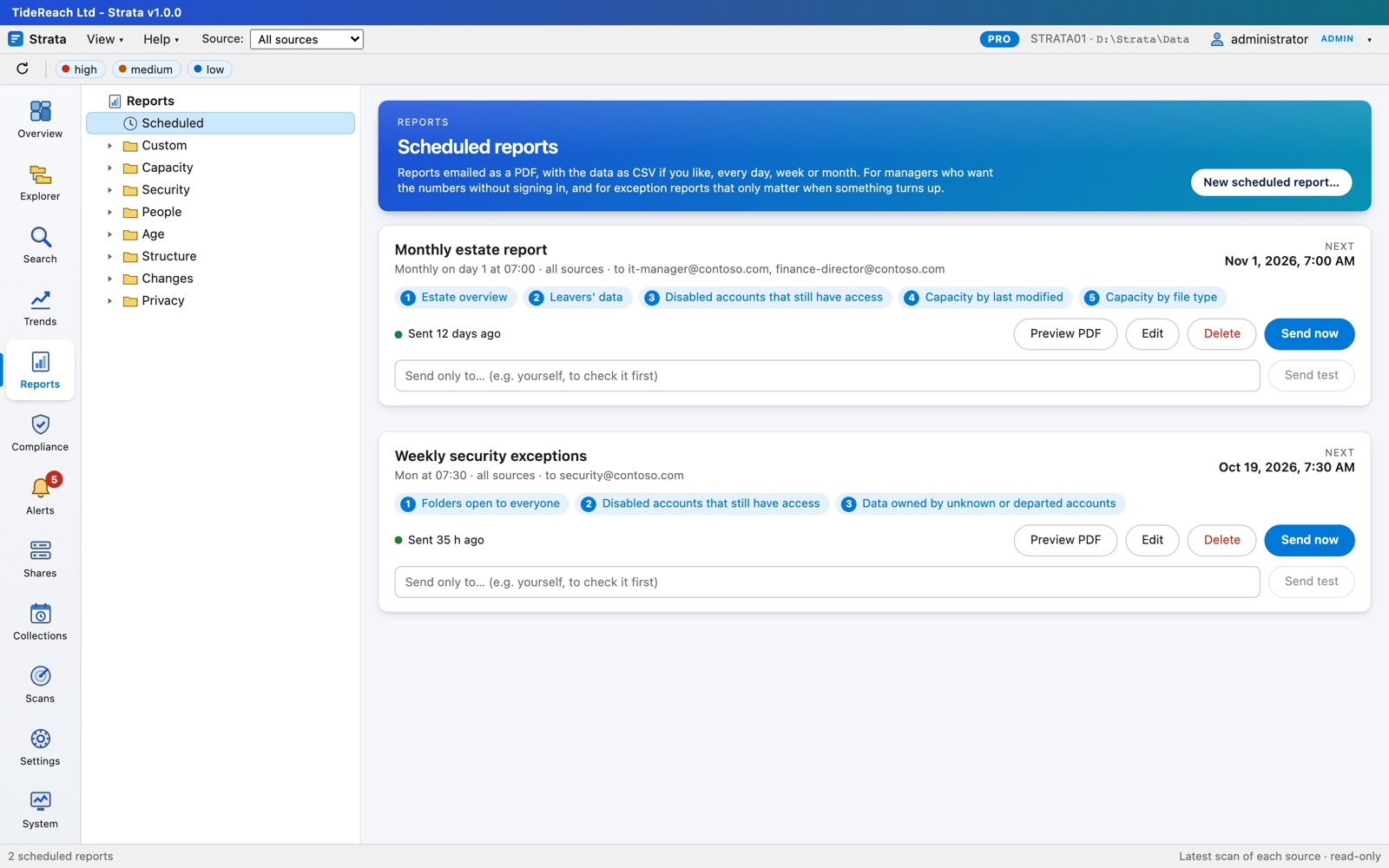
Send the estate overview and the exceptions that need a decision to the people who make it: daily, weekly or monthly, as a branded PDF with the data as CSV. Exception reports can stay quiet until something turns up. Works with SMTP or Microsoft 365.

Scheduled report emails

Custom reports without SQL

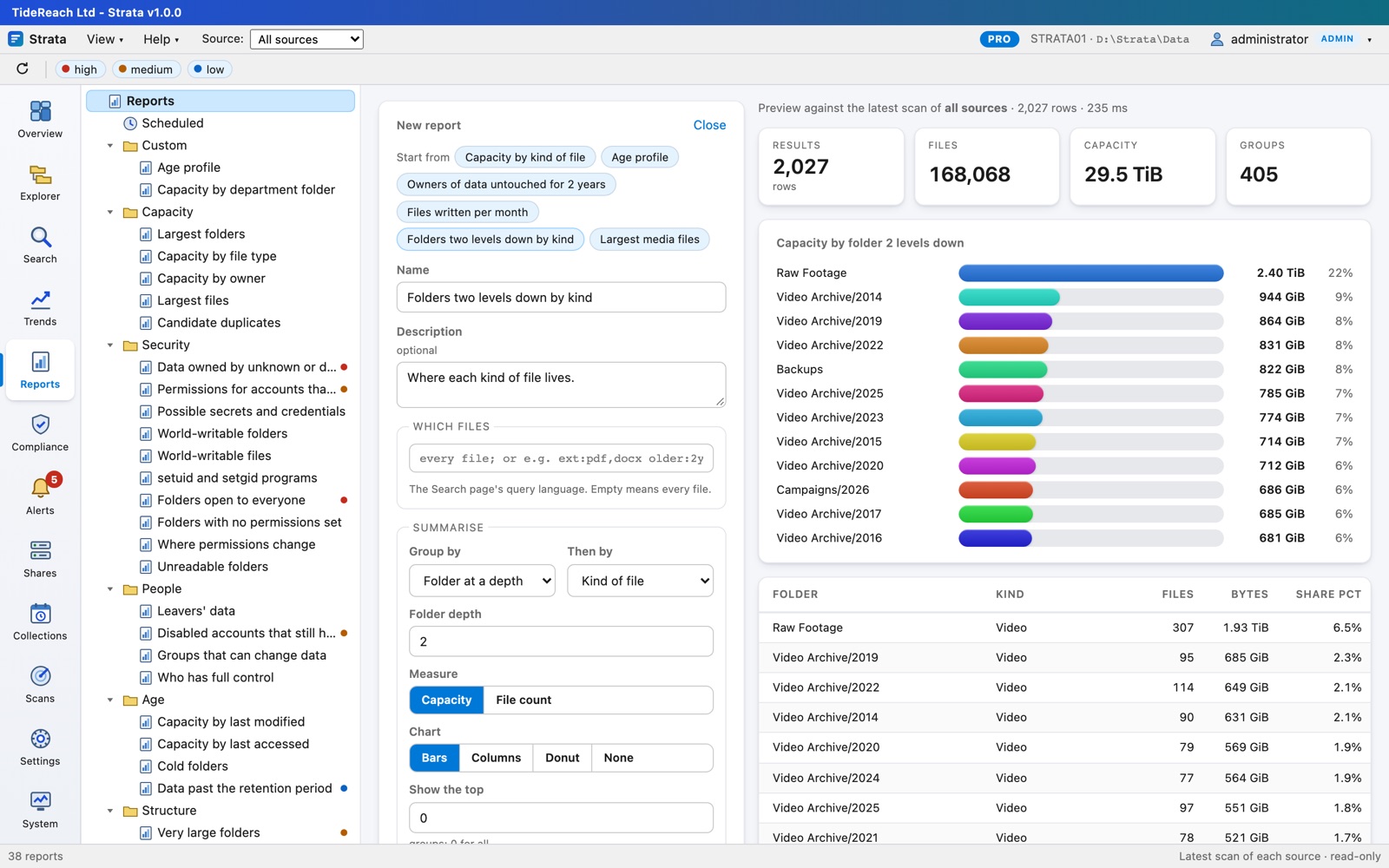
Pick which files, group by up to two of kind, extension, owner, folder, source, age, month or size, and chart it. Save it for everyone.

Report builder with a live preview

Watches its own storage

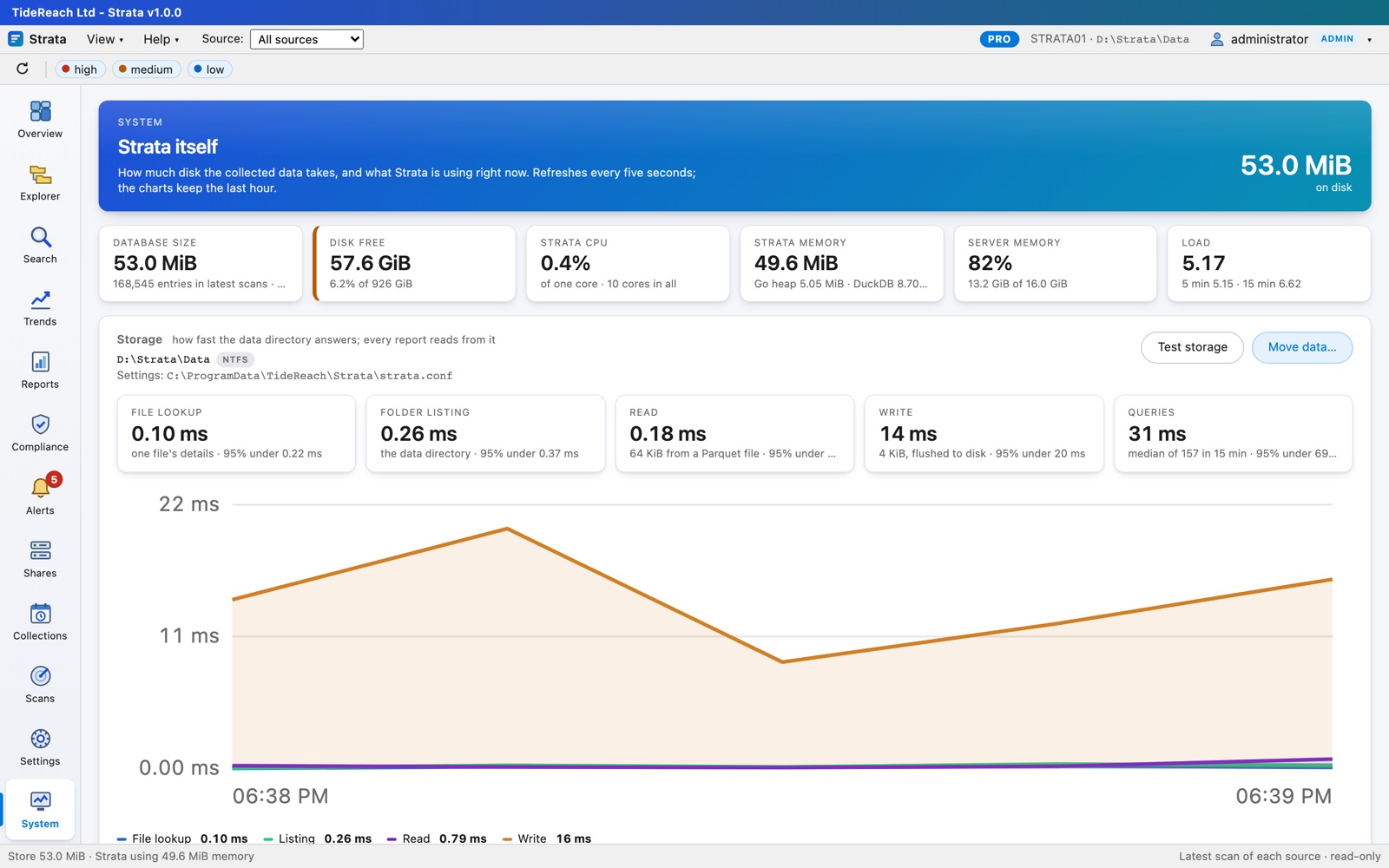
Strata measures how fast its data directory answers and warns when it slows down. Outgrown the disk? Move the data while Strata keeps running.

System page with storage response times

Nothing leaves your network

Strata reads by default: it never touches file contents, and changes permissions only where you turn that on and approve a plan. It talks SMB and NFS to your file servers and LDAPS to a domain controller, keeps everything on its own disk, and serves the console over HTTPS with your certificate. Licence keys verify offline; there is no telemetry.

Installation

One package, fifteen minutes to the first report.

Install on any Windows Server 2016 or later, or a Linux server with systemd. Nothing goes on the file servers: Strata reads them over the network with a read-only account.

Install

Windows:

msiexec /i Strata-1.0.0.msi /qn

Linux:

sudo dnf install ./strata-1.0.0-1.x86_64.rpm

Open the console

Browse to https://server:8443, enter the setup token the installer shows, choose where the data lives and create the administrator.

Add a share and scan

Add a read-only account, point a collection at \\fs01\Finance or a mounted NFS export, and run it. Connect Active Directory for names, groups and people.

Everything is in the Installation Guide; day-to-day use is in the User Guide.

Pricing

Priced by the capacity you analyse, not by users or servers.

Every edition scans as many servers as you like and has as many console users as you like. A licence covers the total size of the data Strata analyses, for 12 months, on one installation. Prices are fixed in pounds sterling and US dollars; pay in either.

The price shown is the full amount charged: no VAT is added.

Free

£0forever
  • Up to 2 TB in 3 sources
  • Overview, Explorer and Search
  • Capacity, age, structure and change reports
  • Scans run when you start them
Download

Standard

from £395per year, up to 10 TB
  • Everything in Free, any number of sources
  • Scheduled scans and retention
  • Trends, scan comparison and days-until-full forecasts
  • Scheduled PDF reports by email
  • Alerts to Teams, Slack and webhooks
  • Saved and watched searches, custom reports
  • Share inventory for SMB and NFS
Start a trial

Pro

from £695per year, up to 10 TB
  • Everything in Standard
  • Who has access, and the people behind every group
  • Leavers' data with their managers
  • Disabled accounts that still have access
  • Security reports: open folders, null DACLs, dead SIDs, possible secrets, permission changes
  • Share permissions in the inventory
  • Compliance packs: UK GDPR, Cyber Essentials, ISO 27001
  • Access reviews by the data's owners, with an audit trail
  • Remediation applied by Strata with approval, or as scripts; backed up and undoable
  • Personal data by file name, and where everyone can open it
Start a trial
Capacity analysedStandard, per yearPro, per year

Every new licence starts with a free 30-day trial key for your installation; if you keep Strata, we invoice you and the 12-month key follows payment. Capacity is the total size of the latest scan of every source. A licence runs for 12 months from issue and does not renew automatically; Strata warns 30 days ahead. If you grow past your band, you have 30 days' grace to upgrade, pro rata for the months left; after that new scans pause until you do. Reports and collected data are never locked. Over 500 TB, or several installations, ask for a quote.

Against disk-usage tools

TreeSize and WizTree answer "what is big" on one machine, today. Strata keeps history, covers every server and share, and knows who can reach what.

Against audit suites

Data-security suites need agents or file-server auditing, a SQL database, and a budget priced per server or per user. Strata is one service that reads over the network.

Against scripts

PowerShell can list ACLs. It cannot expand nested groups into people across a million folders, chart it, keep it for trends and alert on change.

For managed service providers

Look after your customers' file servers with Strata.

Install Strata at each customer's site, where it scans locally and nothing needs VPN access. Each customer gets their own licence, sized to their data, with the key and invoice coming to you.

Today: one install per customer

A Windows or Linux install at each site, with its own key in the customer's name. Monthly PDF reports and compliance evidence packs go to your service desk and the customer by email, and alerts from every site can land in one Teams channel or your ticketing system.

Partner pricing

Per-customer Standard and Pro licences at partner rates. When requesting a licence, enter your customer's organisation and your own email: the key comes to you. Email hello@strata.tidereach.uk for partner pricing.

Planned: one console for every customer

A multi-tenant hub: every customer's capacity, risks and compliance status on one page, one alert feed, customer logins that see only their own data, your branding on every report, and site collectors that push scans out over HTTPS. Tell us if you would use it: demand decides when we build it.

Register interest in the multi-tenant console

We use this only to decide what to build and to tell you when it is ready. See the privacy statement.
Questions

The things people ask first.

Does it install anything on my file servers?

No. Strata reads shares over SMB (and NFS exports through a read-only mount) from its own server, with a read-only account you give it. It never opens or changes your files, changes permissions only where you turn that on and approve a plan, and needs no agent, no file-system auditing and no database server.

What storage does it work with?

SMB shares are read directly over SMB 2 and 3: Windows file servers, Samba, and NAS appliances such as NetApp, PowerScale, Synology, QNAP and TrueNAS. NFS exports are scanned through a read-only mount on a Linux Strata server, and local paths directly. Amazon S3 is on the roadmap. If your storage misbehaves, tell us: we would rather fix it than lose you.

How much space does Strata's own data take?

Roughly 60 to 120 bytes per file per scan kept, compressed. Ten million files with twelve scans kept is about 10 GB. The System page shows exactly what it uses and how fast its disk answers.

How is capacity counted for the licence?

As the total size of the latest scan of every source. Older scans kept for trends do not count. The Licence page in Strata shows how much you use against your licence at any time.

What happens if we go over, or the licence expires?

Nothing immediately. Strata warns and gives 30 days' grace. After that, new scans pause until a renewal or upgrade is installed. Everything already collected stays readable: you never lose access to your reports.

Do I need Active Directory?

No, but you get much more with it: names instead of SIDs, nested groups expanded to people, disabled and deleted accounts flagged, managers for leavers' data, and sign-in with AD accounts. It reads AD over LDAPS or StartTLS with the same read-only account.

Can I move the licence to another server?

A key is issued for one installation. If you rebuild or replace the server, email us the new Installation ID from Settings, Licence and we will reissue the key for the rest of its term.

How do upgrades of Strata itself work?

Install the newer MSI, .deb or .rpm over the old one. Settings, data, licence and sessions are kept. Updates are included for the licence term.